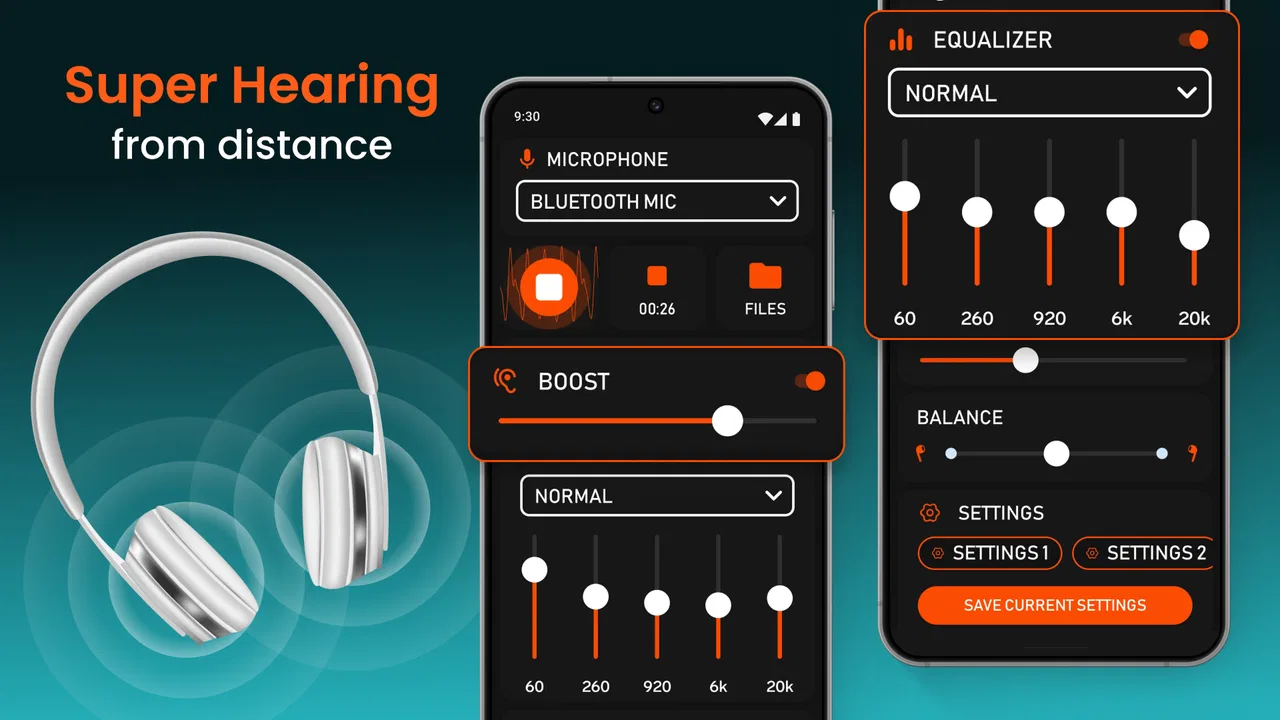
Super Hearing from Distance
- 4.6
- Rating
- 500.00K
- Installs
- Free
- Price
 Analysis by App-foxy
I approached Super Hearing from Distance as a practical listening aid rather than a replacement for medical equipment. Developed by DOSA Apps, this free medical app is designed to make nearby sound easier to hear through a phone, whether that means a conversation, television audio, a lecture, or another everyday situation. My first impression was that its value depends less on dramatic amplification and more on choosing the right setting, placing the phone carefully, and keeping expectations realistic.
The idea is simple: your phone becomes the listening point, and the sound is made more noticeable through the device’s audio output. That can be useful when I am sitting several feet away from a television, trying to follow someone speaking in a relatively calm room, or attending a class where the speaker is not close enough for every word to come through clearly. It works best as a situational listening tool, not as a diagnosis, hearing test, or substitute for advice from an audiologist.
The app has built a strong audience, with a 4.7 average from around 13 thousand ratings and over 500 thousand installs. Those figures suggest that many people find the basic concept useful, but they do not guarantee the same result on every phone or in every room. Microphone quality, speaker placement, background noise, headphones, and the user’s hearing needs all affect the experience.
You May Also Like

 Blood Strike: 2.5 Anniversary
Blood Strike’s Loadouts Turn Every Drop Into a Tactical Gamble
A close look at Blood Strike’s custom loadouts: how fast access to signature weapons reshapes its battle royale rhythm, rewards preparation, and narrows the gap between fights.

 Pandora - Music & Podcasts
Pandora’s Music Is Easy to Start, but Harder to Recover
Pandora’s strength is its low-effort path from a seed to a station. Its weak spot is how much confidence it asks you to place in connection, setup, and quiet recovery.

 8 Ball Pool
 Is Built on Rivalries, Rematches, and Routine
A close look at the rivalries, rematches, shared routines, and unanswered safety questions that turn a quick pool match into a persistent mobile community.

 Samsung Music
’s Quiet Strength Is Playing What You Already Own
Its reach comes less from spectacle than from dependable access to a personal library. That simplicity is both the app’s strongest retention engine and its ceiling.

 AccuWeather: Weather Radar
AccuWeather Review: A Quick, Clear Forecast for Everyday Decisions
For everyday plans, the best forecast is the one you can understand quickly. AccuWeather makes rain timing, radar, and local conditions easy to act on, with a few trade-offs.

 Hill Climb Racing
Why Hill Climb Racing Still Turns Crashes Into One More Run
A tiny car, a bumpy hill and one more upgrade: Hill Climb Racing keeps resurfacing because its simple chaos makes every near-miss feel personal.
More From Our News Desk



What to expect before you begin
The first thing I would tell a new user is not to expect the app to magically separate every voice from a noisy environment. A phone microphone hears the room as a whole. In a quiet space, that can be enough to make speech or television audio more comfortable. In a busy café, beside traffic, or during a loud family gathering, unwanted sound can still be captured along with the voice you want.
That limitation is important because it changes how I use the app. I do not simply place the phone anywhere and assume the result will be clear. I treat the phone like a small remote microphone: I put it closer to the person speaking or nearer to the television, then listen from a comfortable position. A few inches of repositioning can matter more than repeatedly changing the volume.
For a first-time user, the most reassuring part is that the app’s purpose is easy to understand. It is aimed at louder listening, not at complicated hearing analysis. The store summary specifically focuses on surrounding sounds, conversations, television, and lectures, so those are the situations where I would test it first. Starting with a quiet television program or one familiar speaker makes it easier to judge whether it is helping.
The app is free to install and is suitable for Everyone, which makes it approachable for households where several people may want to try it. It supports Android devices starting with version 5.0, and the current version is 1.1.6.5. DOSA Apps offers optional in-app purchases ranging from $0.99 to $99.99 per item, so I would pay attention to any purchase screen and begin with the free experience before deciding whether anything extra is worthwhile.
Setting it up without overthinking it
My recommended setup is deliberately modest. Install the app, open it in the room where you expect to use it, and begin with the phone’s microphone aimed toward the sound source. If the television is the target, place the phone near the television rather than beside your chair. If another person is speaking, place it on a table between you and that person, while keeping it stable and close enough to capture speech clearly.
I would start with the phone’s own speaker for the first test. This gives a quick sense of whether the app is producing a useful change without adding another device to the process. Once the basic result is clear, headphones may be worth trying if they provide a more direct or comfortable listening experience. The important point is to change one thing at a time: first position, then output method, then volume.
Do not begin in the most difficult environment. A room with a running fan, kitchen appliances, several conversations, and television audio is a poor place to decide whether the app works. I get a much more useful first impression by choosing a quiet room, playing a familiar program, and comparing ordinary listening with the app-assisted sound. Familiar voices help me notice whether words are easier to follow rather than merely louder.
It is also worth keeping the phone secure. A device balanced on the edge of a table can slide, vibrate, or point away from the speaker. A stable position reduces the need to keep adjusting it while listening. For a lecture or conversation, I would place it where it can remain undisturbed and avoid covering the microphone with a case, hand, or loose fabric.
The first meaningful success
A good first test is a short television scene with one person speaking. I would launch the app, put the phone near the television, and listen for a minute without chasing maximum loudness. The goal is not simply to make the sound stronger. The useful result is being able to follow more words with less effort at a comfortable volume.
If the speech still sounds weak, I would move the phone closer before turning everything up. If it sounds loud but unclear, I would move it away from competing noise or change the listening position. This is one of the most practical lessons with an amplifier-style app: clarity usually begins with placement, not volume. Excessive volume can make listening tiring and may make distortion or room noise more noticeable.
For a conversation, I would use a similar routine. Ask the other person to speak normally, place the phone between both people, and test a few sentences. If the phone is too close to one person’s clothing or resting against a hard surface, handling noise may become distracting. A quiet table is usually a better starting point than holding the device loosely in one hand.
Lectures are a more demanding use case. The app may help when the speaker is reasonably close and the room is not excessively noisy, but it cannot guarantee that every word will be captured from the back of a large hall. I would test it before relying on it for an important class or presentation. If the speaker moves frequently, the phone may need to move too, which is not always convenient.
That trial-first approach answers a question many users have after installation: how quickly can I tell whether this is useful for me? In my experience, a quiet television or one-to-one conversation provides an answer within a few minutes. If speech remains difficult in that controlled situation, I would not assume that turning the sound up further will solve the problem.
Where new users can get confused
The most common misunderstanding is treating amplification as automatic noise removal. The app can make surrounding audio more prominent, but a phone microphone does not know which sound matters to you unless the environment gives it a reasonable chance. A nearby fan may become more noticeable, and a person sitting behind you may be picked up less clearly than someone directly in front of the phone.
Another source of confusion is the difference between loudness and intelligibility. Louder audio is not always easier audio. If the room is echoing, if several people speak at once, or if the phone is too far away, increasing volume may produce a stronger version of the same muddled sound. I would first reduce the distance and background noise, then make small volume changes.
Users may also expect the app to behave like a dedicated hearing aid. That is not how I would position it. A hearing aid is designed around a person’s hearing profile and is worn consistently. This app is more flexible for occasional situations, but it depends on a phone being placed in the right location and may be less discreet or less practical when moving around.
There is a privacy consideration in ordinary use as well. Because the phone is being used to capture surrounding audio, I would avoid placing it in situations where recording or listening could make other people uncomfortable. In a classroom, workplace, medical setting, or private conversation, I would follow the rules of that environment and ask permission when appropriate. The app’s usefulness does not remove the need for basic courtesy.
Battery and comfort also shape the experience, even when the listening result is good. Keeping a screen active and processing sound can be inconvenient during a long program or lecture. I would start with shorter sessions and keep the phone connected to power only when that is safe and practical. I would not leave a phone in an unstable location near liquids, heat, or a crowded table just to maintain a listening position.
Everyday situations where it makes sense
One realistic example is watching television with another person who prefers the room to stay quiet. Instead of raising the television volume for everyone, I can place the phone closer to the set and listen from my chair. This does not turn the phone into a perfect personal audio system, but it can reduce the need to make the whole room louder. The benefit is greatest when the television is the main sound source and other noise is low.
Another useful situation is a short conversation at home. If someone is speaking from across a table and I am missing parts of the sentence, placing the phone between us may make the voice easier to follow. I would still ask the person to face the phone and speak normally. The app is not a reason for people to shout, and ordinary communication habits remain important.
A lecture or presentation can be workable when the phone has a clear line toward the speaker. I would use it as a personal aid for listening, not as a way to capture or preserve the entire event. If the room has strong echoes or the speaker is moving around, the advantage may shrink quickly. For a formal accessibility need, I would ask the venue about its own assistive listening system before depending on a phone.
The app may also suit someone who wants occasional help rather than a permanent device. A family member might keep it available for television evenings or visits, while another person may use it only during a small meeting. That flexibility is a genuine strength. There is no need to wear or carry specialized hardware, although the phone must still be positioned and managed during use.
On the other hand, I would skip it as a primary solution if you need reliable hearing support throughout the day, customized correction, discreet use while walking, or strong performance in crowded environments. I would also be cautious if hearing difficulty is new, worsening, one-sided, or accompanied by other symptoms. An amplification app can make sound louder, but it cannot explain why hearing has changed or provide clinical care.
How it compares with familiar alternatives
Compared with simply raising the television volume, the app offers a more personal approach because the phone can be placed nearer to the source while the listener remains at a comfortable distance. That can be helpful in shared rooms. The trade-off is that the phone becomes part of the setup, and poor placement can make the result less useful than expected.
Compared with ordinary headphones connected directly to a television, the app may be easier to try because it uses a phone rather than requiring a television with compatible audio features. However, dedicated headphones can be more consistent for a single listener once properly configured. The app is more attractive when I need a quick, portable experiment or want to position the microphone near a speaker.
Compared with a dedicated hearing aid, the difference is much larger. Hearing aids are intended for ongoing use and professional fitting, while this app is a situational amplifier. The app wins on accessibility and low commitment; a hearing aid wins when a person needs personalized support, dependable mobility, and a solution that does not require setting a phone on a table.
Compared with a venue’s assistive listening system, the app is convenient when no such system is available, but the venue system may have a cleaner signal because it is designed around the room and speaker. I would consider Super Hearing from Distance a useful backup or casual option, not automatically the better technical choice.
Small habits that improve the result
I found that testing with familiar speech is more informative than testing with music. Music can sound louder while still hiding whether spoken words are easier to understand. A news segment, dialogue-heavy program, or conversation with a family member gives a clearer answer about the app’s main purpose.
I would also create a repeatable placement routine. For television, use roughly the same spot near the sound source each time. For conversation, keep the phone centered and stable. For a lecture, arrive early enough to test where the speaker’s voice reaches the phone most directly. This turns the app from something I keep fiddling with into a simple listening workflow.
A further tip is to make comparisons at equal comfort rather than equal loudness. Listen normally for a moment, then use the app and reduce the volume until both options feel similarly loud. If the app still makes words easier to follow, it is adding practical value. If it only makes everything louder, the placement or environment may need attention.
I would not hide the phone under clothing, cushions, or a bag. That can block the microphone and introduce rubbing sounds. I would also avoid placing it directly against a vibrating television cabinet or noisy appliance. These details are easy to overlook because the app itself is simple, but they often determine whether the first attempt feels successful.
Who should try it and who should choose something else
I think the app is a sensible first experiment for someone who occasionally struggles with television, a nearby conversation, or a relatively quiet presentation. It is especially appealing when the person wants to test an idea before spending money on dedicated equipment. Since the app is free to start and rated for Everyone, trying it in a controlled room is straightforward.
It is less suitable for someone who expects automatic speech isolation, clinical hearing correction, or reliable results while moving through noisy public places. People with significant hearing loss may find that louder sound is not enough to restore clarity. In that situation, a hearing professional can offer a more appropriate assessment and recommendation.
I would also avoid making it the only plan for an important event until I had tested the exact environment. A phone can be misplaced, blocked, run low on power, or overwhelmed by room noise. For a class, meeting, or performance that matters, I would treat the app as one possible aid and keep a backup listening strategy available.
My final take after using it
Super Hearing from Distance is most convincing when used with modest expectations. Its strength is not that it transforms a phone into medical equipment; its strength is that it offers a quick way to bring a sound source closer through careful placement. For television, one-to-one conversation, and some quieter lectures, that can be a meaningful improvement.
The learning curve is short, but the best results come from habits that are easy to miss: aim the microphone, reduce competing noise, test with familiar speech, and adjust placement before chasing volume. Those steps make the first successful experience much more likely than simply opening the app in a noisy room.
DOSA Apps has made a free medical utility that is approachable for occasional listening needs, while optional purchases mean I would review the screen carefully before buying anything. With its release on Jul 31, 2020 and its current version 1.1.6.5, it is a mature option to try on compatible Android devices, but the decision to keep using it should come from your own listening test rather than its popularity alone.
My recommendation is simple: try it first with a quiet television or a trusted conversation, keep the phone close to the sound source, and judge success by clearer understanding rather than maximum loudness. If that modest workflow helps, the app can earn a useful place in your routine. If it does not, or if your hearing needs are ongoing, a professional hearing assessment or dedicated assistive device is the better next step.
FAQs for Super Hearing from Distance
01What is Super Hearing from Distance and how does it work?
Super Hearing from Distance is an app designed to enhance your hearing capabilities by using your device’s microphone to capture ambient sounds and play them back through your headphones. It uses advanced audio processing technology to amplify distant sounds, making it useful for various situations such as lectures or nature walks.
02Is Super Hearing from Distance compatible with all headphones?
Yes, Super Hearing from Distance is compatible with most wired and wireless headphones. However, for optimal performance, using high-quality headphones is recommended. The app works best with headphones that have good noise isolation and clear audio reproduction, ensuring that you can hear amplified sounds clearly.
03Does Super Hearing from Distance require an internet connection to function?
No, Super Hearing from Distance does not require an internet connection to function. The app processes audio locally on your device, which means you can use it anywhere without worrying about data usage or connectivity issues. This makes it convenient for outdoor use or in areas with poor signal.
04Are there privacy concerns when using Super Hearing from Distance?
The app is designed with user privacy in mind. It does not record or store any audio captured by the microphone. All audio processing is done in real-time and locally on your device. However, users should be mindful of legal and ethical considerations when using the app in public or private settings.
05Can Super Hearing from Distance cause hearing damage?
While the app is designed to enhance hearing, it's important to use it responsibly. Prolonged exposure to high volume levels can cause hearing damage. Users should ensure that the volume is set to a comfortable level and take regular breaks to prevent any potential harm to their hearing health.
Pros
- Enhances audio clarity significantly.
- Simple and intuitive user interface.
- Wide range of volume adjustments.
- Works well with Bluetooth devices.
- Low battery consumption.
Cons
- Requires headphones for optimal use.
- Background noise can be amplified.
- Limited free version features.
- No offline functionality.
- May not work well in noisy areas.

Super Hearing from Distance
Gallery